


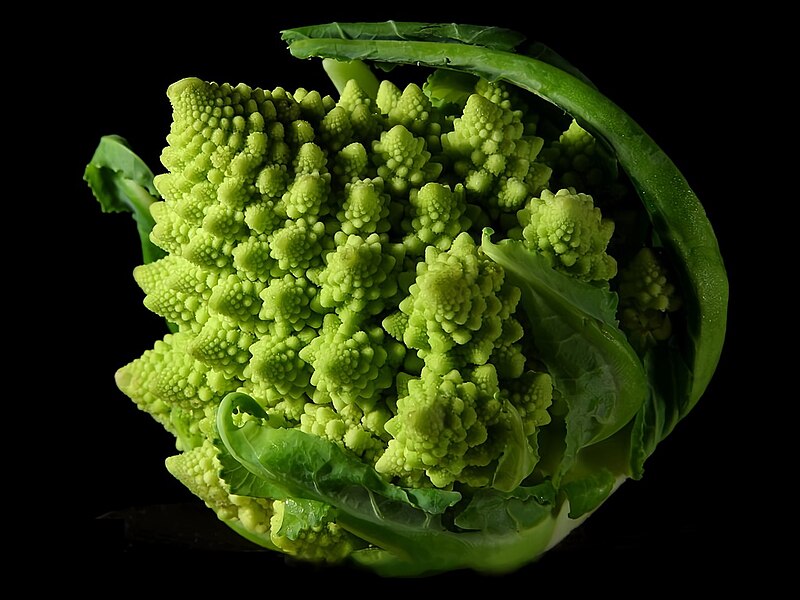
A fractal is a geometric shape that, when broken down into its constituent parts, contains the same approximate shape exhibited in the whole.
One of the simplest and most popular fractals is the Koch Snowflake, an infinitely recurring pattern of equilateral triangles.

What do pubescent boys and DNA helicases have in common?
They both want to unzip your jeans.
[28/05/09 13:45]
Got back on the writing horse. Now fleshing out the ideas. What tone should I use?
[16/05/09 10:52]
I should probably get back to finishing this piece. I was sidetracked by starting up Pokemon Platinum.
[05/05/09 15:30]
I have decided to make this a companion piece to the actual Porcelain Philosophy post, whereby I log changes I make to the actual post here. As it stands, that post currently does not exist. I should also reverse the order of these updates to make it easier for me.
[05/05/09 15:21]
I'm adding timestamps for those that are less steadfast in their clicking of refresh (use F5). As you can see, I am hard at work. Wait, that came out wrong.
[05/05/09 15:18]
[Links to be referenced:]
http://en.wikipedia.org/wiki/Real_number
http://en.wikipedia.org/wiki/Irrational_number
http://en.wikipedia.org/wiki/Men_Are_From_Mars,_Women_Are_From_Venus
[05/05/09 15:09]
For nothing more than fun, I thought I'd publish this post instead of saving drafts so anyone logging lots of time on this blog can sort of see my writing in action. Also because I accidentally posted this placemarker post empty. This might also break the RSS feed readers.
Let's get crazy. [Cheesy intro]
[05/05/09 15:09]
armpit!
Pocketfish is in the middle of some renovation at the moment. I still need to sit down and hash out the colour scheme, standardize fonts and clean up the template clutter. Your opinions and suggestions on the new decor are welcome. Eventually, I would like to design a template from scratch; alas, I am currently not brave enough.
EDIT: Dec 20
Added Post Expansion to long entries to keep scrolling on the main page to a minimum. To expand a post, click the button below to see the rest of it.
Instead of "Read more..." or similar text, I decided to craft a little button that matched the theme of the blog. I am hoping the plus sign is self-explanatory enough.
The first time I took up Samurize was documented in this previous post. Having successfully removed the clutter from my desktop workspace, the background developed a potential for functionality. At that time, I chose to turn it into an at-a-glance Heads Up Display of sorts for things like battery life, processes, CPU, hard drive and RAM usage. In the intervening years, the little widget on the bottom-left corner of my desktop evolved from being amateurish eye-candy to a more utilitarian box of bars and numbers.
It was adequate and useful, but generally a bit of an eyesore because it looked so out of place. So pitiful was the design that I even set a keyboard hotkey to hide the thing from view. For the most part, I prefer form and function to walk hand in hand and those previous attempts left something to be desired. However, I never bothered to change it because I never really had any particular urgency, or any particular inspiration, to gussy it up.
Last week, a blog post on Lifehacker popped up on my radar. They have been featuring the desktop customizations of an enterprising and generous individual. Naturally, seeing something awesome makes me want to be awesome too.
I won't burden you with having to see the 'before' desktop (it was boring) or with how it was created, per se, as Samurize has a bit of a learning curve that cannot be expained with words as well as it can be learned from trial and error.
Here is the new one: Click the screenshot for notes. Click here for full size.
List of Programs (etc) that contributed to this desktop:
Overall Theme: FlyaKite w/ Leopard 3.0 Visual Style (Dark)
Wallpaper: Dawn in Madrid
Windows Explorer Address Bar: QT Address Bar
Windows Task Bar: Finderbar 3.1
System Tray: Dexpot and Notebook Hardware Control
Application Launcher: Launchy 2.0 with MinimaLaunchy skin
Dock: ObjectDock with Konfabulator Glass skin, Leopard GTD Icons
Desktop Monitor: Samurize, collapsible self-made config
System: Asus Z63a Pentium M 1.83 GHz running Windows XP SP3

The Ford Mustang has updated its branding for the 2010 model.
The change is subtle, but significant.
I think it can go further than that, so I've taken the liberty of redesigning the iconic Mustang badge even futher. You're welcome, Ford.
During the month of May, I worked with Excel quite a bit entering marks. The spreadsheet was spread throughout 20+ worksheets (the tabs at the bottom). As a proponent of the keyboard and the speed it offers data entry tasks, it was a chore to navigate between worksheets, to say the least. How I longed for an Alt-Tab-like solution to cycle through the sheets.
Today, I had another data entry task with only two worksheets to flit between. I was already doing everything manually by mouse (copying and pasting some cells to match up to a row in another sheet). Recalling my past despair, I resolved to take a stand and find a keyboard shortcut, even if I had to install AutoHotKey and program one for this very reason.
First things first: when you encounter a problem, it is always best to do some research. Chances are, someone has come across the same issue and already found a solution. So I googled "excel switching worksheets" and found this. By golly, I giggled and clapped my hands for a minute, and then proceeded to put down my task just to write this.
To switch between worksheets in Excel: Ctrl + Pg Up/Pg Dn
I got into work early this morning. At the doorway to the bathroom I frequent, I beheld an amazing sight. There was a sizeable, light-coloured insect in a state of disassemblage on the floor in front of the door. Picking through the wreckage was a slightly smaller dark insect with a chitanous carapace.
I wanted to stay and watch, but I also had to use the bathroom. After I finished my business, they were still right there on the floor. I hopped back into my office (next to the bathrooms), grabbed a piece of paper, and scooped them up for closer examination on my desk.
Of course, once they were placed on the desk, the still-living insect bolted for the nearest cover (a Compaq Presario v5000). I played hide and seek with it for about 6 minutes, but quickly tired of its survival instincts. What I wanted to see was its gluttony so that I could capture the feeding on camera, so I proferred the remnants of its meal, still on the paper, to the scurrier but to little avail.
Clearly it was not comfortable eating in plain sight where it preceived imminent danger. So I relocated them to the floor under my desk. Under relatively darker evirons, the black bug was content to return to feeding. I filmed it with a point-and-shoot camera (Casio Exilim Z55) that was woefully ill-equipped to handle dark and close-up work. Nonetheless, I faithfully captured the moment the best I could, partially lying on the floor of my room while some automated processes were running.


I ponied up for a new phone last week: the LG KF510. It's the prettiest, shiniest thing I've ever put in my pocket.
Sean Tevis for State Representative of Kansas
Can you resist the allure of references to:
this past monday was Apple's WWDC (developers conference), where they announced a launched a plethora of promising items (iPhone 2.0 & 3G, OS X Snow Leopard, MobileMe). the upgraded iPhone garnered the greatest amount of attention from the intertubes. i'll admit that i was not interested in the first iPhone, but exposure to it has softened my stance over the months, and now the iPhone 3G's foray into Canada has piqued some interest.
what i was really pleased about was Snow Leopard, the next OS X. it is set to launch next year, which is exactly the time i plan on acquiring a new notebook (see The Plan). it will be light on new visible features, but high in refining processes and performance. its main focus will be utilizing the new hardware (multi-core processors) more efficiently and effectively. while some people find the name confusing, i, for one, think it is awesome. this is not simply because i heart snow leopards, but because the name speaks to the incremental nature of the improvements. essentially, OS X 10.6 will be the same as 10.5 Leopard, but with changes under the hood.
---
on Tuesday, June 17, Mozilla will be releasing Firefox 3.0, the much awaited upgrade to the lacklustre Firefox 2.0. even though i'm not a regular Firefox user, i am still excited for this release. from what i've seen in the beta, 3.0 is vastly superior to 2.0 in terms of memory usage, speed and general usability. aside from the wonderful collection of extensions and add-ons, Firefox does a lot of the little things well -- like in-line spellchecking and update management. Mozilla is looking to break the Guiness World Record for number of downloads in one day with Firefox 3.0's release. here's your chance to become part of history, or, if you're like me, wait until the day after, when the servers are less stressed and shaft them out of one more download.
---
Opera 9.5 (Kestrel) was finally released today to subdued fanfare (relative to the above news). Opera currently holds 0.7% of the world's marketshare of browsers used. this is reflected in North American usage, but not indicative of European statistics, where it is the browser of choice for a significant number of countries. i've been using Opera since 9.0, so i'm a newbie in comparison to the stalwart users from 1994, when the company first entered the browser market.
like Firefox 3.0, Opera 9.5 is a fairly significant improvement over 9.27. i've been using the alphas and betas upon their respective releases, so the speed increase and some of the features are not quite so novel. however, there have been a few changes made since the last build i used (beta 2). the most marked difference is the new default skin in Windows. i must say that i am not a fan of some aspects of the new look, but they are not too obtrustive. apart from those minor niggles, there is plenty to be pleased about. i will likely devote a separate post to Kestrel in the near future. for the uninitiated, Lifehacker has a short roundup of what's sexy in this latest release.

the above is a subset of the people of the world we live in, plotted onto a graph that shows their likely level of 'goodness' at any instant, on a scale from 0 to 10.
so you don't cheat, steal, kill or fornicate with animals. most people would say that you are a decent human being -- a nice, pleasant, good person. by golly, you don't even cuss or download mp3s or dance in public (want a medal?). you read the Bible, the Koran and the Torah every night before bed, pray before every meal and visit to the bathroom, kiss your mom goodnight and leave a 16.7% tip minimum for every service rendered. hallelujah! praise the Lord because you always say, 'praise the Lord' after something good happens.
this next graph shows the same numbers as seen in the previous graph, but in the context of God.
our 'goodness' compared to others, in the context of God, is negligible; our 'goodness', in the context of the truly Good, is nothing. still, in our decrepitude, God reaches down to offer saving grace for all who accept it. no one receives any more or any less than the other.
similar to music videos, music slideshows are a series of pictures set to a piece of music. two years ago, if someone asked me to set a slideshow to music, i would have shrugged and said that it couldn't be done, having once tried for hours to no avail. but that was back when i was impatient and not yet adept at Googling for help.
Music:
assuming you want to use a song for your presentation, go to Insert > Movies and Sounds > Sound from File... and find the MP3 (most other formats are not supported, but midi and wav are usable). now i'm tired of writing, so i'll just link you to better instructions. it has screenshots for Powerpoint 2003.
If the song doesn't work: MP3s cannot be embedded into the presentation (incorporated into the slideshow file) and are linked instead. Powerpoint calls up the audio file based on the filepath of the MP3 when it was inserted. Powerpoint will not be able to play the song for a number of reasons:
over the past year or two, i have had the pleasure of editing and marking some lovely pieces on a wide variety of topics. where there is pleasure, however, there is pain. today, i am wasting my 500th post on the most egregious (hi, Lyris!), and most pervasive grammatical sins i have encountered.
These errors have always been their, its because your stupid.
The following errors are the result of generations of people writing the way they speak.
There/They're/Their
There - the opposite of here. e.g. "She went over there."
They're - equivalent to "they are." e.g. "They're not present."
Their - the 3rd-Person Plural Possessive Determiner. e.g. "The dog was their responsibility."
Its/It's
Its - the 3rd-Person Singular Gender-Neutral Possessive Determiner, as in "Defeating the Russian at the game of chess was its finest moment."
It's - equivalent to "it is." e.g. "It's time to d-d-d-d-duel!"
Your/You're
Your - the 2nd-Person Possessive Determiner. e.g. "You must have lied; your pants are on fire."
You're - equivalent to "you are." e.g. "You're fired."
Comma Splices
I defer to the Wikipedia entry.
The Future Generation of Grammatical Errors
The following have developed in recent years due to the elimination of formal grammar teaching in education. They are intriguing to the descriptive linguists and infuriating to the prescriptive linguists.
'They' is the new 3rd-person singular gender-netural pronoun!
I don't want to tell you who ate the cupcake because they would be mad.In this politically correct day and age, we no longer default to the masculine for catch-all phrases. Instead of taking the time to say, 'him or her,' or 'he or she,' we now use 'them,' or 'they' as the 3rd-person singular gender-neutral pronoun when referring to people. This shows up quite frequently in anecdotes where the speaker, or writer, tries to preserve the subject's privacy by obfuscating the gender with the incorrect use of 'them' and 'they.'
Buy 20 Hamburger's!
"I can't believe they left without me! They could of told me first!"This one causes me the greatest pain. In fact, I will go so far as to say that I hate this error the most. I don't hate the people that commit this error, but I do hate the error. This is a textbook example of how people craft their sentences based on the way they sound when spoken. "Could/should/would of" makes no syntactical or semantical sense.
the should-i-should-i-not-get-Facebook poll is drawing to a close, with one day left to vote. as of this writing, Yes has a commanding 7-1 lead over No. nay-sayers should get on their horses and fight the good, but pointless fight. otherwise, y'all can just look forward to stalking me by the end of the week.
---
and for those that are oddly interested in this sort of thing:
i started my internship this week at the elementary school i volunteered at last May, working with a grade 6 class, primarily to help them prepare for the upcoming EQAO testing.
today, i spent most of the day in the library coding an Excel spreadsheet to analyze the marks from a standardized reading test that was done earlier in the school year for the grade 7/8 class. it took a long time because a) i'm not a programmer; b) i've forgotten most of Excel; c) i'm way too ambitious about spreadsheets sometimes.
the analysis called for counting the number of students in each level per question by gender. i thought a handy COUNTIF function would suffice as i use it all the time for counting things in columns that fit a certain criteria. unfortunately, the AND function does not work in conjunction with COUNTIFs. after devising a crude workaround (sorting by gender and COUNTIFfing for those specific ranges) i happened upon a new function: SUMPRODUCT.
this function operates with arrays, which allows me to basically do a count with multiple criteria. here's the tutorial i found just after i printed out the poorly coded version. so i spent about half an hour editing everything with SUMPRODUCT formulas instead of COUNTIFs.
ex. =SUMPRODUCT((B2:B50="M")*(C2:C50=3))to count the number of male students who scored a Level 3 on the first part of the first question.
ever wonder how those matchmaking sites find people to make matches?
i always thought it'd be something like this:
Matchmaker 1: okay, it's your turn to throw the darts.
Matchmaker 2: so we're putting the green ones together?
Matchmaker 1: and the blues. try to get them in the nostrils.
Matchmaker 2: don't we have to send these photos back?
x dot y = x1y1 + x2y2 + ... xnyn.
x dot y = |x||y|cos(theta).
© Blogger template The Professional Template by Ourblogtemplates.com
Back to TOP


